
How to download FSSAI certificate online?
Every Food and Beverage organisation (FBO) in India needs a FSSAI (Food Safety and Standards Authority of India) license or registration.
Monjima GhoshUpdated 2 min read
Table of contents8 sections
Every Food and Beverage organisation (FBO) in India needs a FSSAI (Food Safety and Standards Authority of India) license or registration. This is a legal requirement, without this, a food business cannot be operational. A FSSAI license is a document that certifies that the food business has complied with all the regulations and guidelines set by the FSSAI. Food organisations need this certificate to be able to access all the FSSAI registration services. If you need to download the certificate, here's how to do it:
Step-by-step guide on how to download FSSAI certificate
Visit the FSSAI website
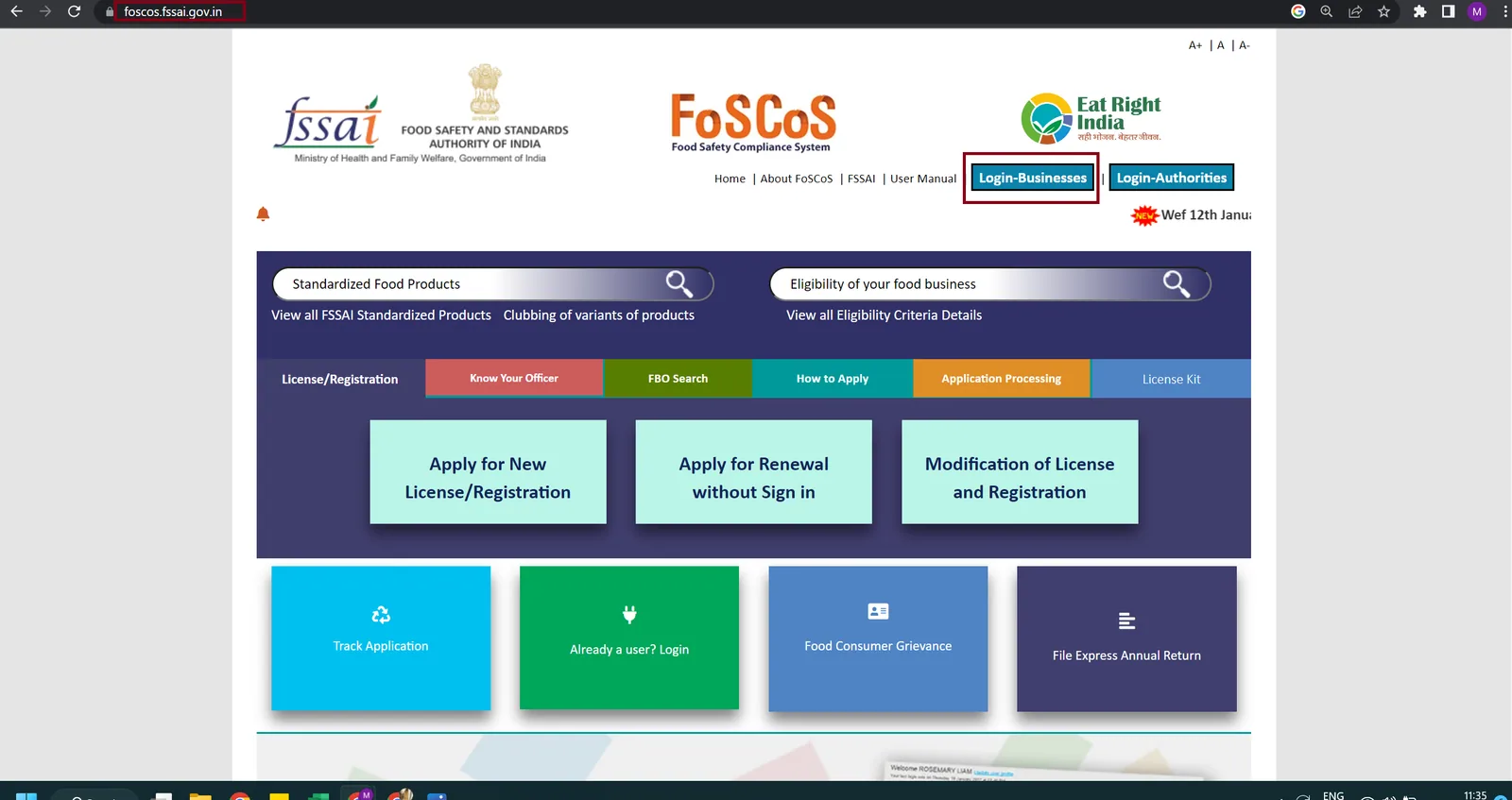
The first step is to visit the FSSAI FoSCoS website. Once you're on the website, click on the 'Login-Businesses' tab.
Sign-in to your account
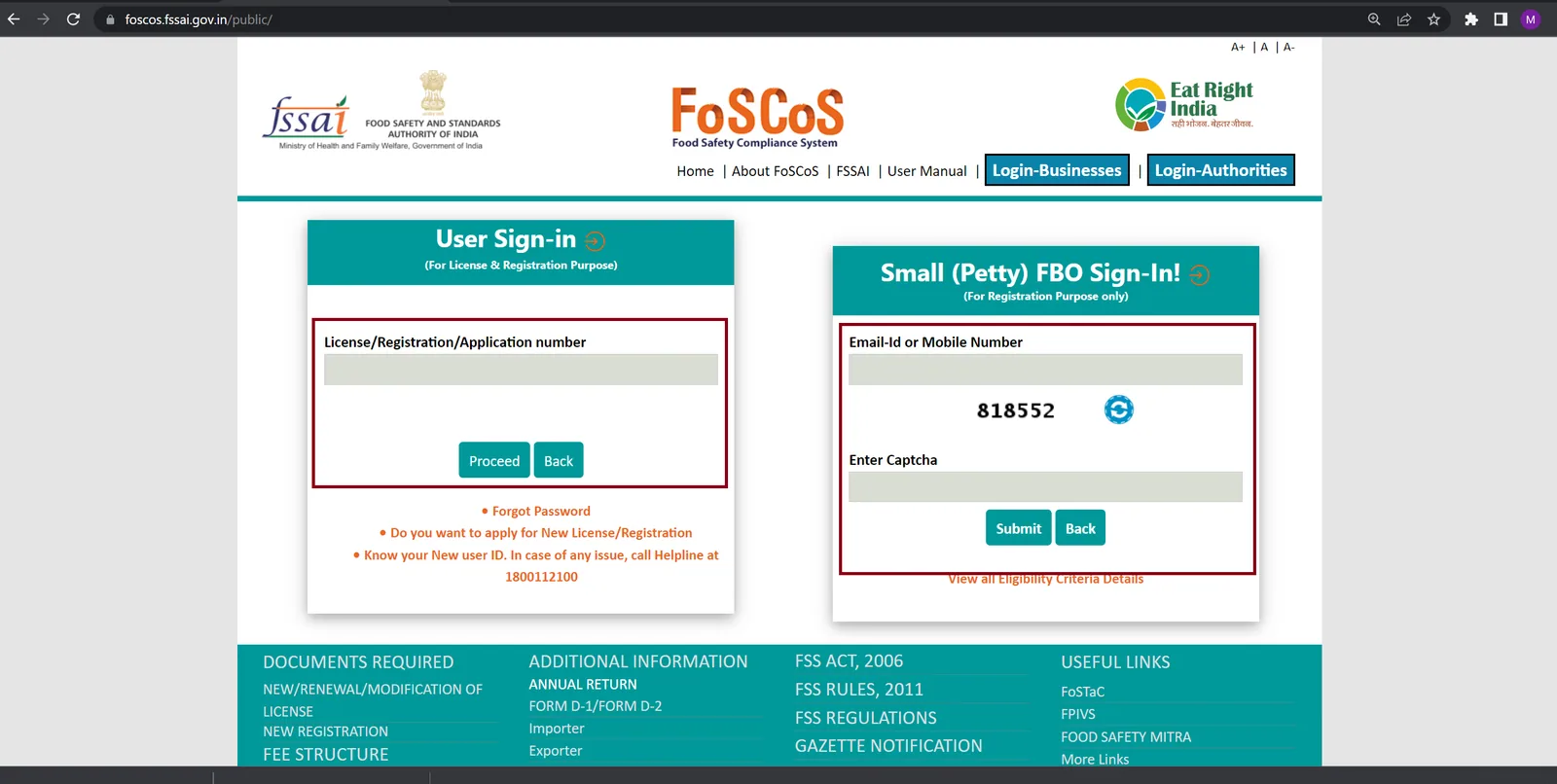
This will take you to a new page. Here you have to put in your application or registration number and click on the proceed button. After that, you have to finish OTP verification for sign-in/login. Alternatively, if you had applied for a basic registration you can log in by providing your email id or mobile number (Small FBO login) and captcha. You will have to do OTP verification as the next step for logging in via this method as well.
Go to the 'Dashboard' page
After you've logged in to your account, you'll be taken to the 'Dashboard' page. This page displays all the licenses and registrations associated with your account.
Select the license/registration for which you need the certificate
On the 'Dashboard' page, you'll see a list of all your licenses and registrations. Find the license or registration for which you need the certificate and click on the 'View' button next to it.
Download the certificate
On the license/registration details page, you'll see a button labelled 'Download Certificate'. Click on this button to download your certificate. The certificate will be downloaded in PDF format.
Note: It's important to note that the FSSAI certificate download option is only available for businesses that have successfully finished the FSSAI license or FoSCos registration process.
Conclusion
In conclusion, downloading the FSSAI certificate is a simple process that can be done online. By following the steps outlined above, you can download your certificate in a matter of minutes. If you encounter any issues during the process, you can contact the FSSAI helpdesk for assistance. So, make sure to keep your FSSAI license up to date and download your certificate whenever you need it.
Frequently asked questions
Can I download my FSSAI certificate online?
Yes, you can download your certificate online by logging in to your account on the FSSAI website and following the steps outlined in this article.
Is the FSSAI certificate download option available for businesses that have not obtained a FSSAI license?
No, the FSSAI certificate download option is only available for businesses that have obtained an FSSAI license.
What format will my FSSAI certificate be downloaded in?
You can download the certificate in a pdf format.
What should I do if I encounter any issues during the FSSAI certificate download process?
If you encounter any issues during the FSSAI certificate download process, you can contact the FSSAI helpdesk for assistance.
Is it necessary to keep my FSSAI license up to date?
Yes, it is necessary to keep your FSSAI license up to date to ensure that your food business is operating legally and in compliance with all regulations and guidelines set by the FSSAI.

Written by
Monjima is a lawyer and a professional content writer at LegalWiz.in. She has a keen interest in Legal technology & Legal design, and believes that content makes the world go round.
All articles by Monjima GhoshServices related to this article
Everything here is handled online by our specialists, start to finish.
Comments