
How to Download GSTR 3B
Are you a GST taxpayer struggling to navigate the complexities of filing GSTR-3B returns every month?
Monjima GhoshUpdated 3 min read

Table of contents11 sections
Introduction
Are you a GST taxpayer struggling to navigate the complexities of filing GSTR-3B returns every month? Well, fear not, because we have got you covered! In this article, we will take you on a step-by-step journey to demystify the process of downloading GSTR-3B return from the GST portal. With our expert guidance, you'll be able to breeze through your return filings with ease, leaving you with more time to focus on your business. So, let's get started on this exciting adventure!
Confused how to go about GST Return filing?
Choose LegalWiz for hassle-free GST return filing
What is GSTR 3B return and who needs to file it?
GSTR-3B return is a summary return that needs to be filed every month by all GST-registered taxpayers. The GSTR 3B Return format is such that it has 7 tables which provide a summary of the taxpayer's outward and inward supplies. It also provides information about eligible input tax credits and tax liability for a specific tax period. This return is mandatory for all regular taxpayers. This also includes those who have zero tax liability or have not made any outward supplies during the month. Failing to file GSTR-3B within the prescribed due date can result in late fees and penalties. Therefore, it is crucial for all GST-registered taxpayers to file GSTR-3B accurately and on time to avoid any legal consequences.
Why download GSTR 3B?
Downloading your GSTR-3B return is a crucial step in complying with GST regulations. As a GST taxpayer, it is mandatory to file your GSTR-3B return every month. Downloading it from the GST portal is the only way to obtain an official copy of your return. It provides a summary of your taxable supplies, input tax credit, and tax liability for a specific tax period. By downloading it, you can keep a record of your filed returns and ensure that you are in line with the GST compliance requirements. Additionally, having a copy of your GSTR-3B handy can come in handy during GST audits or in case of any discrepancies. Hence, downloading your GSTR-3B return is not just necessary but a crucial step towards maintaining transparency and compliance in your business dealings.
How to Download GSTR 3B from GST Portal?
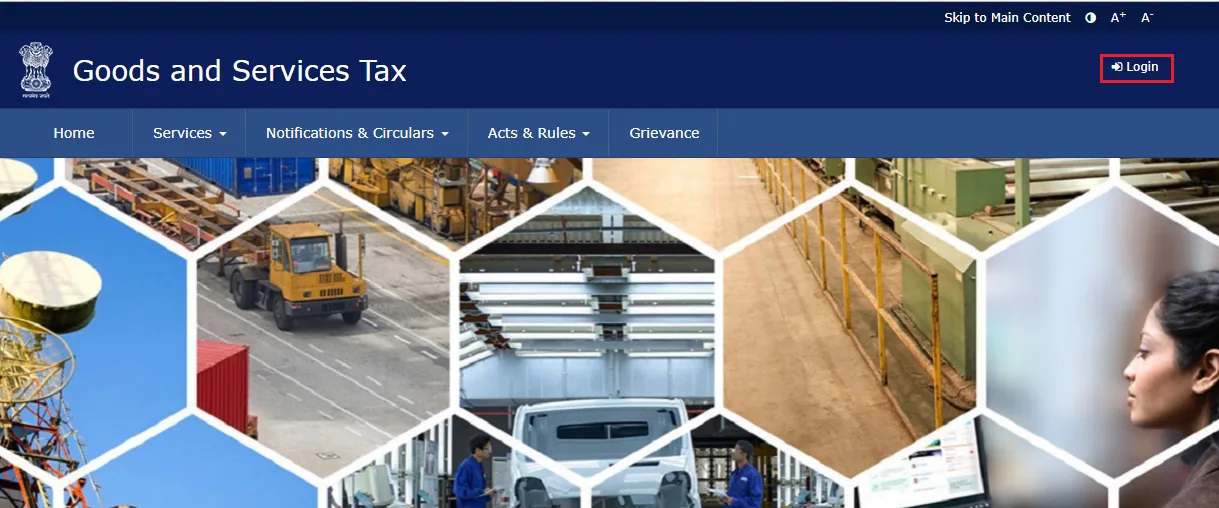
Step 1: Log in to the GST portal using your registered credentials.
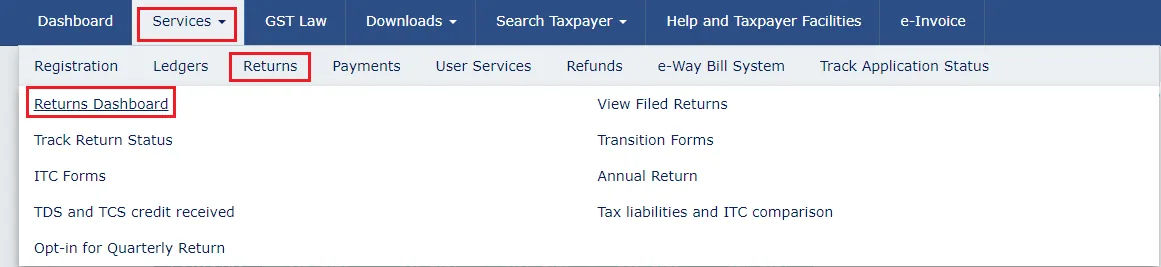
Step 2: Click on the 'Services' tab and select 'Returns'. Select 'Returns Dashboard' from the drop-down menu.
Step 3: Under the 'Returns Dashboard' section, select the financial year and return filing period for which you want to download GSTR-3B. Click on the 'Search' button to proceed.

Step 4: go to the GSTR-3B tile and click on the 'DOWNLOAD' button under it.
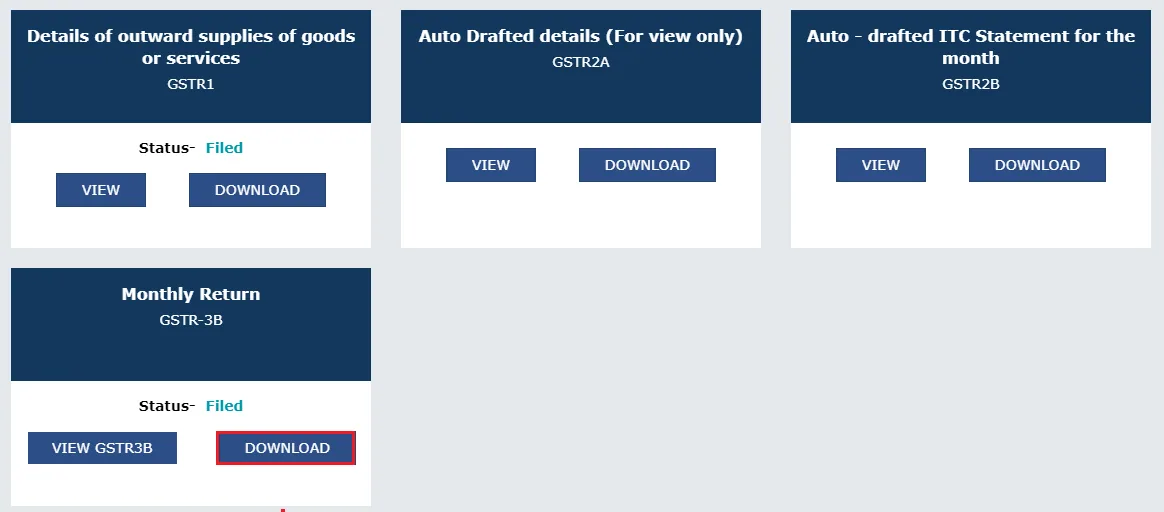
That's it! You have successfully downloaded GSTR 3B from the GST portal.
Alternatively, you can also download the file while filing GSTR 3B return itself. To do that you just need to click on the 'Download filed GSTR-3B' button right after filing it.

Conclusion
In conclusion, downloading GSTR 3B from the GST portal is a simple process. By following the above steps you can easily get a copy of your GSTR 3B. As a GST taxpayer, it is crucial to stay up-to-date with your compliance requirements, and downloading your returns is an essential part of it. Keeping records of your returns is also vital for future reference and audit purposes. With a Compliance Calendar for 2023 in place, it is crucial to stay compliant and avoid any penalties or legal issues. By downloading and filing your GST returns on time, you can ensure a smooth and hassle-free experience while focusing on growing your business.
Frequently asked questions
Can I download multiple GSTR-3B returns at once from the GST portal?
No, you can only download one GSTR-3B return at a time from the GST portal. You need to follow the above steps for each return separately.
Can I file my GSTR 3B return without downloading the offline tool?
Yes, you can file your GSTR 3B return online without downloading the offline tool. You can fill in the details directly on the GST portal and submit your return.
Can I file my GSTR 3B return using the offline tool and then download it from the GST portal?
Yes, you can file your GSTR 3B return using the offline tool and then upload the return on the GST portal. After successfully filing your return, you can download it from the GST portal.
How do I know if my GSTR 3B return has been successfully filed?
You can check the status of your filed return on the GST portal under 'Services' > 'Returns' > 'Returns Dashboard.' The status of your return will be displayed under the 'Action' tab.

Written by
Monjima is a lawyer and a professional content writer at LegalWiz.in. She has a keen interest in Legal technology & Legal design, and believes that content makes the world go round.
All articles by Monjima GhoshServices related to this article
Everything here is handled online by our specialists, start to finish.
Comments